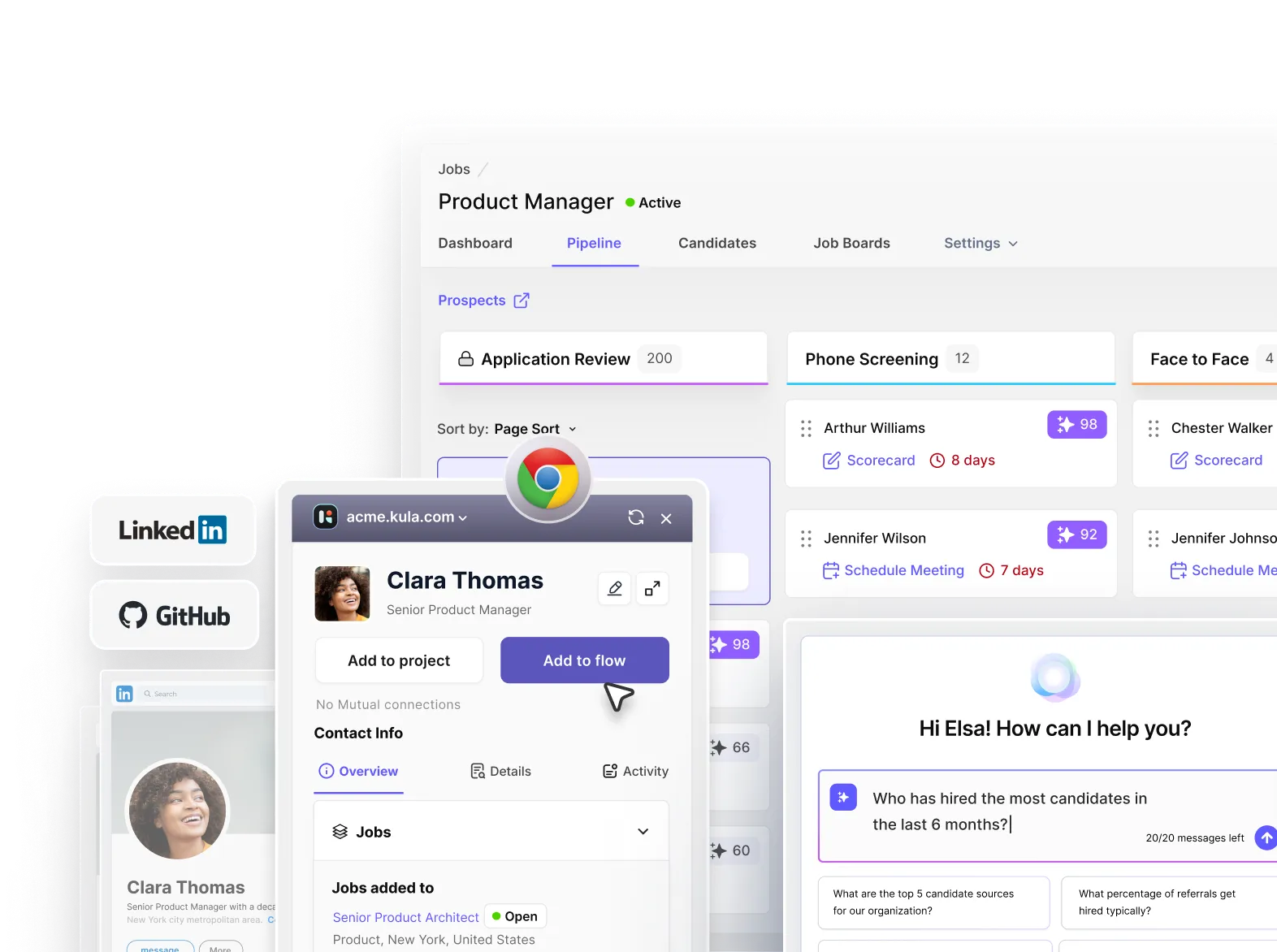



Having been exposed to the nuts and bolts of the recruitment life cycle for more than ten years, I’ve seen firsthand the aftermath of choosing a misfit applicant tracking system (ATS).
Your resources, hiring workflow, and, most importantly, the organization's reputation are at stake if you settle for a substandard ATS vendor.
Based on my direct interactions with our long-term customers, I have compiled the 35+ most critical questions you must ask potential vendors before investing in the tool.
Let’s go!
Why Most ATS Decisions Go Wrong
The mistake starts early: decisions are often driven by feature checklists, brand familiarity, or how well the tool integrates with existing systems.
The second breakdown happens after implementation. Teams struggle with adoption, workflows don’t align with how recruiters actually work, and processes become fragmented instead of streamlined.
This is where the hidden costs show up:
- Tool sprawl slows everything down: multiple tools for sourcing, communication, and tracking create unnecessary handoffs
- Recruiters become coordinators, not closers: too much time spent managing systems instead of engaging candidates
- Workflow gaps lead to delays: candidates fall through stages, feedback loops break, and decisions take longer
- Candidate experience suffers: slow responses and disjointed communication reflect poorly on the company
Choosing an ATS is a workflow decision, not a feature decision.
When You Actually Need a New ATS
You actually need a new ATS when your current system starts breaking your hiring process instead of supporting it. The clearest signal is operational friction—when recruiters are spending more time managing tools than moving candidates forward.
Common signs your ATS is no longer working:
- Tool fragmentation: you’re juggling multiple platforms (ATS + sourcing tools + scheduling + notes) just to complete one workflow
- Manual coordination: constant follow-ups on Slack/email to move candidates across stages
- No pipeline visibility: you can’t clearly see where candidates are stuck or why roles are delayed
- Slow hiring cycles: roles take longer to fill with no clear bottleneck identified
- Recruiter burnout: team feels overwhelmed, reactive, and stuck in admin work instead of hiring
These issues indicate your ATS is not acting as a system, it’s just another tool adding complexity.
However, not every team needs to switch. You likely don’t need a new ATS if:
- Hiring volume is low: only occasional roles, no urgency to optimize workflows
- Team is small (<50 employees): processes are simple and manageable without heavy systems
- Hiring isn’t a core function: recruitment isn’t a major driver of business growth
Switching an ATS only makes sense when hiring complexity outgrows your current system.
ATS checklist: 35+ questions to ask about an applicant tracking system
Workflow & Execution
1. How well does your ATS support virtual recruiting?
What it means: Can your ATS execute the entire hiring journey online via digital tools and support sourcing, interviewing, and onboarding with native integrations?
Why it matters: Such an ATS makes hiring faster, as everything happens in one place instead of managing multiple tools. It also lets you handle higher volumes or remote/global hiring without increasing team size.
What to check:
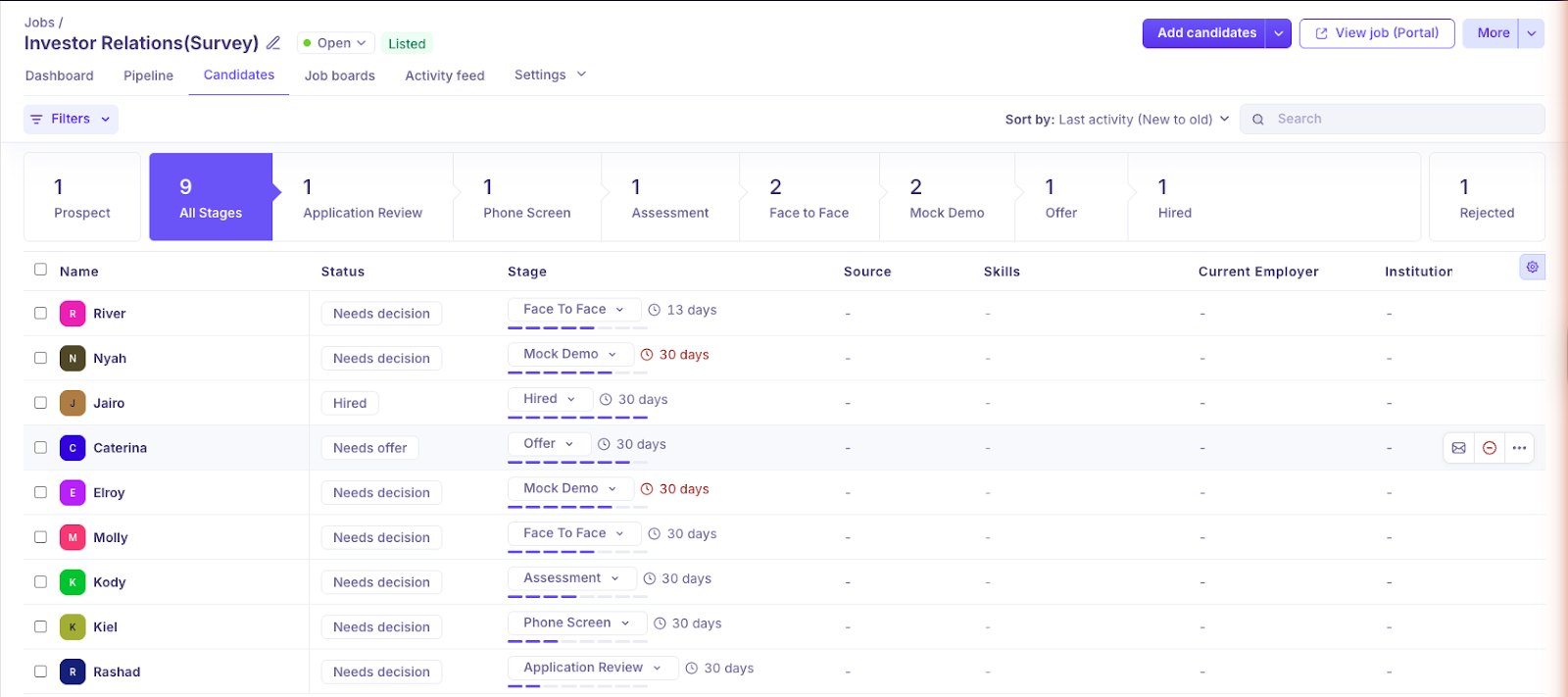
- Does your ATS offer a visual dashboard to track candidates digitally?
- Does it support built-in or native integrations for video interviews (not manual links)?
- Can resumes be parsed and candidates shortlisted automatically at scale with bias-free AI?
- Built-in communication (emails, updates, reminders) flows
Red Flags:
- Requires multiple tools for one workflow
- Manual coordination for interviews
Decision rule:
Ask the ATS provider if you can onboard virtually, access video interviewing tools, parse resumes automatically, and relay personalized messages to candidates, all from one platform.
2. Can your ATS be customized to suit the user's needs?
What it means: Can your ATS adapt to your hiring needs, such as customizable hiring stages, screening questions, application forms, evaluation criteria, and more?
Why it matters: Hiring processes are not one-size-fits-all. If your ATS isn’t flexible, your team will either create workarounds or skip steps.
What to check:
- Role-based hiring stages
- Customized assessments, and tests
- Customize application process based on job/department
- Custom scorecards per role
- Workflow automation (triggers, approvals)
Red flags:
- Requires developer/support help for changes
- Same workflow for all roles
Decision rule:
If you need external tools, manual workarounds, or vendor support to match your hiring process, then the ATS is not truly customizable.
3. Do you have experience working with organizations like mine?
What it means: Does the ATS vendor have proven experience working with companies like yours in terms of industry and scale?
Why it matters: It determines whether the system will actually fit your hiring complexity instead of forcing you into generic workflows.
What to check:
- Experience with your industry or similar hiring models
- Case studies or customers similar to your company size
- Support for your hiring complexity (high-volume, niche roles, global hiring)
- Flexibility to adapt across teams, roles, and geographies
Red flags:
- One-size-fits-all positioning with no industry depth
- Customer base heavily skewed to a different company size
- Features that do not align with your hiring needs
Decision rule: If the vendor cannot show success with companies similar to yours, you are likely buying a tool that was not built for your hiring reality.
Interview management
4. Does it allow seamless interview scheduling (including multiple stakeholders)?
What it means: Can your ATS handle interview scheduling automatically across different stakeholders, such as recruiters, hiring managers, or department heads?
Why it matters: It takes the hassle out of scheduling interviews, even when multiple people are involved.
What to check:
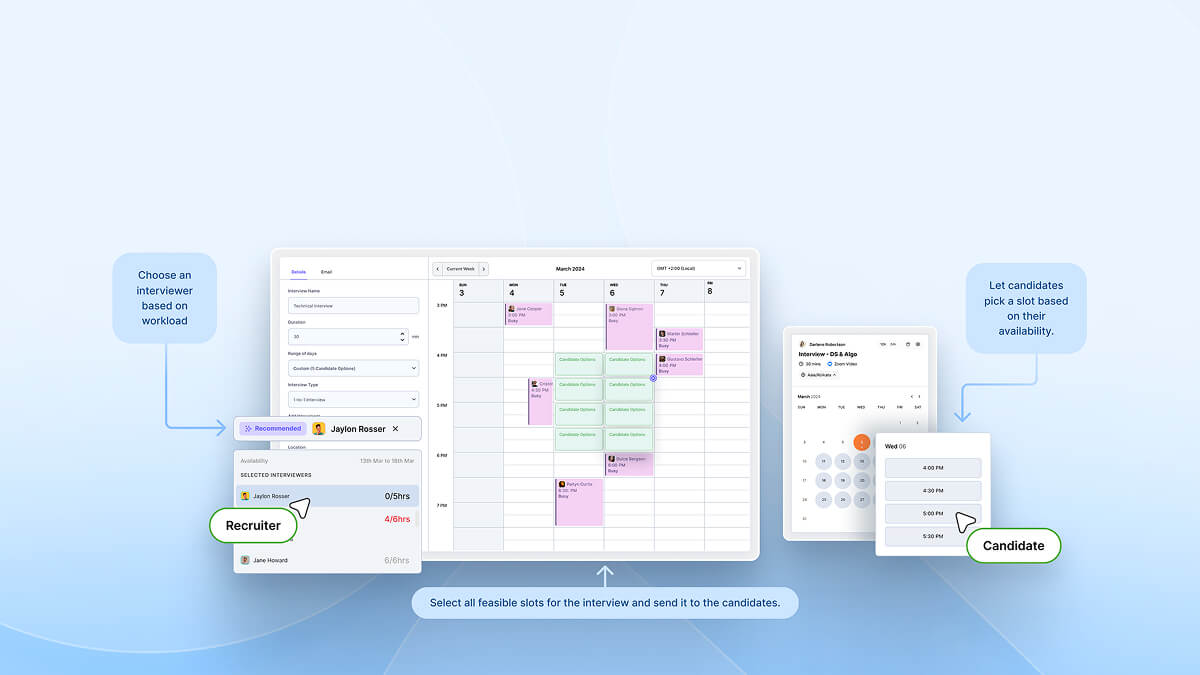
- Real-Time Calendar Sync
- Candidate Self-Scheduling
- Time Zone Intelligence
- Holistic calendar view to avoid double booking
Red flags:
- Manual coordination
- No visibility into interviewer availability
Decision rule:
Run a test: schedule one interview with 3 stakeholders. If interview scheduling delays decisions by even 1–2 days per candidate, the system will slow down hiring at scale.
5. Can notes be taken automatically during interviews?
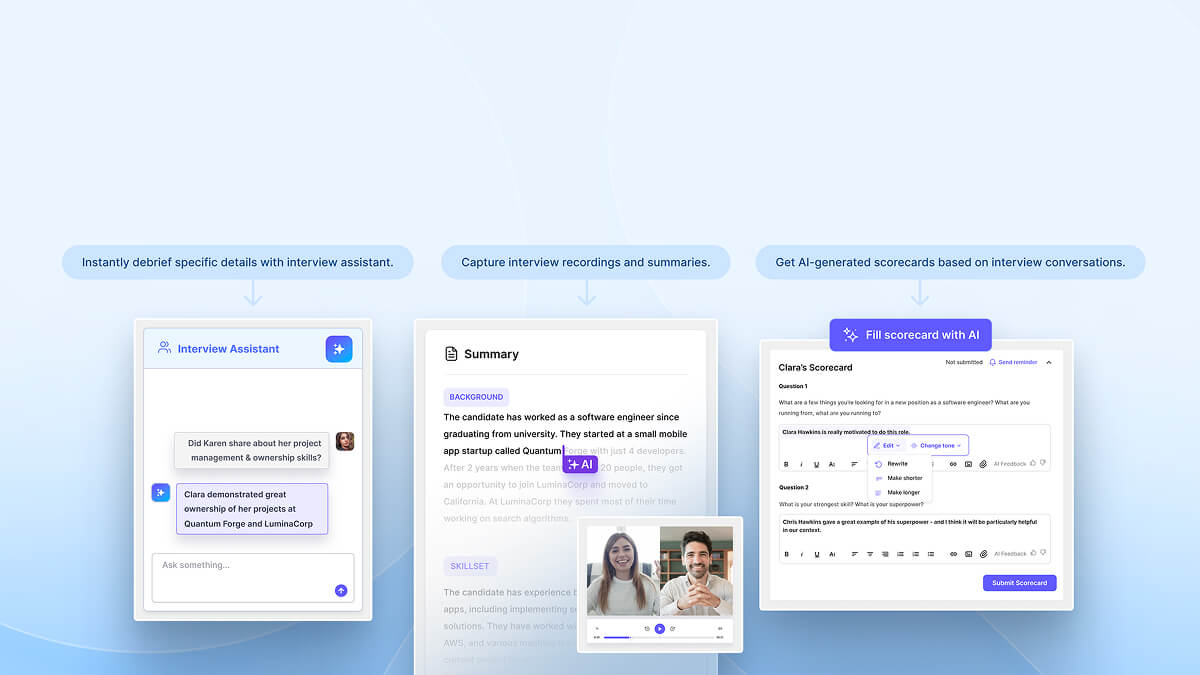
What it means: Can your ATS capture your candidates' interview summaries and transcripts word-for-word automatically?
Why it matters: It helps improve debriefs and make better and faster final decisions.
What to check:
- Native AI-powered interview notetaker
- Native interview summary generator
Red Flags:
- No interview intelligence except scheduling and video platform integration
Decision rule:
Check for the feature and perform a mock interview test to check if it really captures interview notes word-for-word.
6. Can you create a resource library?
What it means: Check if the vendor lets you store all the crucial data, including information gathered based on the competency criteria used across scoreboards and, specifically, interview questions.
Why it matters: It is important to structure your interviews, remove bias and ensure all candidates are evaluated on the same criteria
What to check:
- Centralized library for interview questions and scorecards
- Role-based or competency-based templates
- Reusable evaluation frameworks across teams
Red flags:
- Interviewers create their own questions every time
- No standard scorecards or evaluation criteria
- Knowledge is scattered across docs, emails, or tools
Decision rule:
If interviewers are creating their own questions, using different evaluation criteria, or referring to scattered docs (Google Docs, Notion, emails), your ATS is not standardizing hiring, it’s fragmenting it.
Candidate tracking
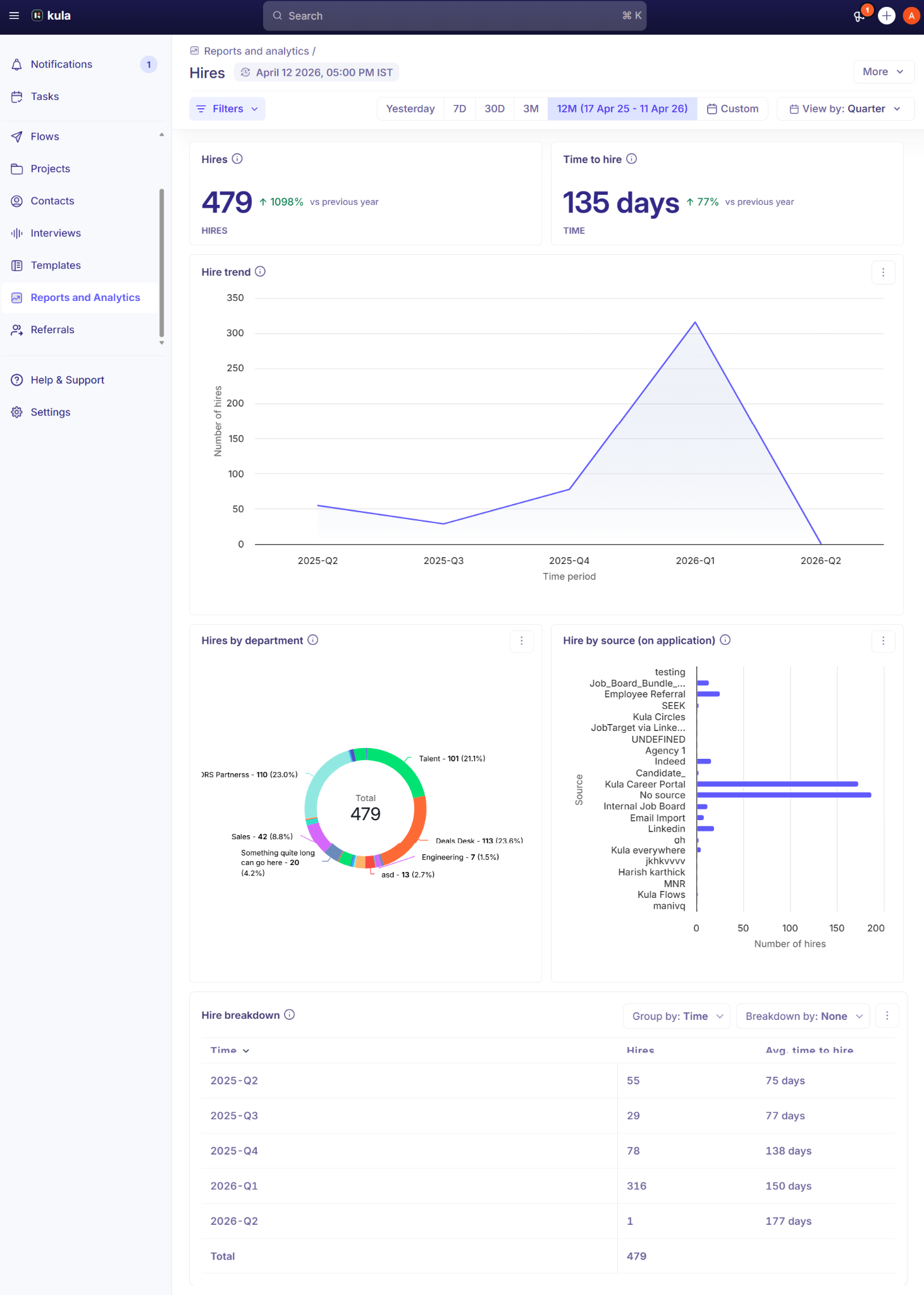
7. Does your ATS track candidate source?
What it means: Ask your vendor if you can track the performance across multiple job boards, social platforms, and even referrals to identify the most effective channels for reaching potential candidates.
Why it matters: To optimize resource allocation and help you save a pretty penny.
What to check:
- Candidate pipeline visibility
- Visual dashboard for recruiting KPIs
Red flags:
- Only tracks application volume, not quality or conversions
- No breakdown of performance by source or channel
- Requires exporting data
Decision rule:
Check the tool’s analytics to see what metrics and insights it provides, and how detailed each metric is.
8. Does your system support resume parsing?
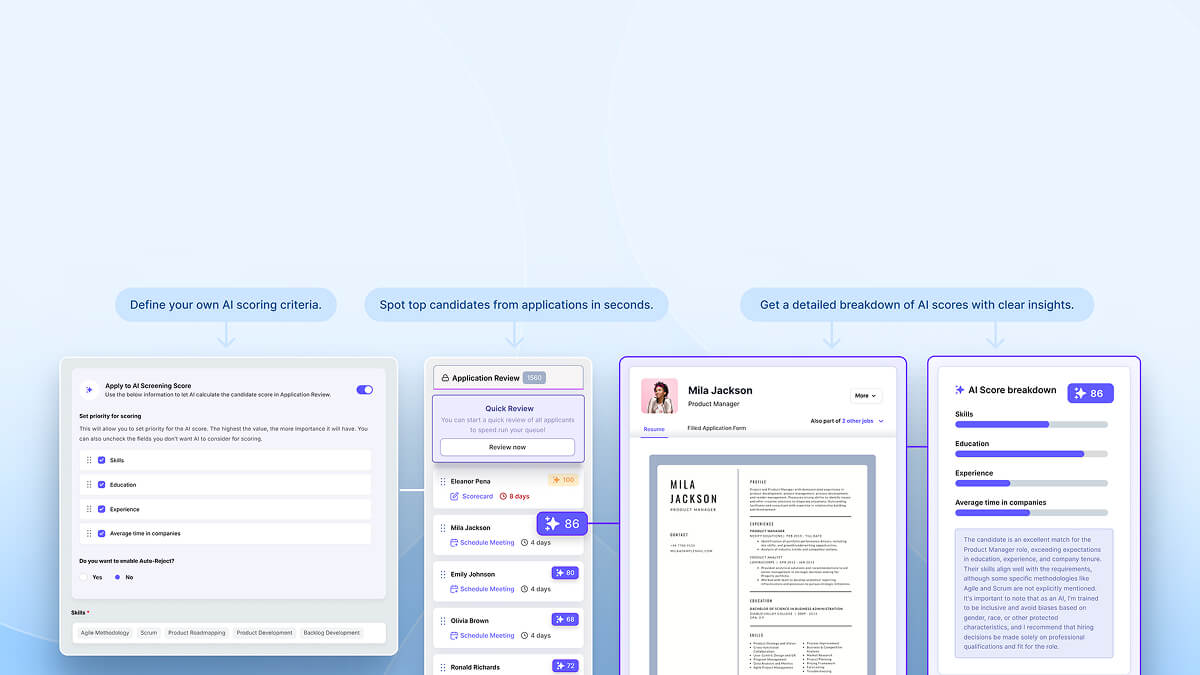
What it means: Check if the ATS vendor offers automated resume parsing capabilities for screening thousands of applications at once against customized criteria.
Why it matters: It directly determines how quickly and accurately you can shortlist candidates at scale without manual effort.
What to check:
- AI scoring of applications
- Customized criteria for application screening
- AI audit and bias-free report
- A clear breakdown of every AI score for each application
Red flags:
- Parsed data is incomplete or inaccurate
- Requires manual correction for most resumes
- Cannot handle different resume formats
Decision rule: If recruiters still need to manually review most resumes after parsing, the feature is not saving time.
9. Does your ATS support advanced search?
What it means: Can your ATS help you quickly find the right candidates from your database using filters, keywords, and Boolean logic?
Why it matters: It determines whether your ATS helps you reuse existing talent or forces you to source from scratch every time.
What to check:
- Boolean search and keyword filtering
- Filters for role, skills, location, and stage
- Ability to segment and save candidate lists
- Fast and accurate search results
Red flags:
- Limited or basic filtering options
- Cannot search across past candidates effectively
- Requires exporting data to find candidates
Decision rule: If you still need to source from scratch for every role, your ATS is not working as a talent database.
10. Can notifications be automated on your ATS?
What it means: Can your ATS automatically send alerts, reminders, and updates to stakeholders to submit feebacks based on workflow triggers?
Why it matters: It ensures hiring moves forward on time without delays caused by missed actions or follow-ups.
What to check:
- Automated interview reminders
- Feedback submission alerts
- Stage-based notifications
Red flags:
- Requires manual follow-ups for every step
- Limited customization of alerts
Decision rule: If recruiters still need to chase feedback and updates manually, the system is not improving execution.
11. Can communication be automated for the hiring process and candidate rejection?
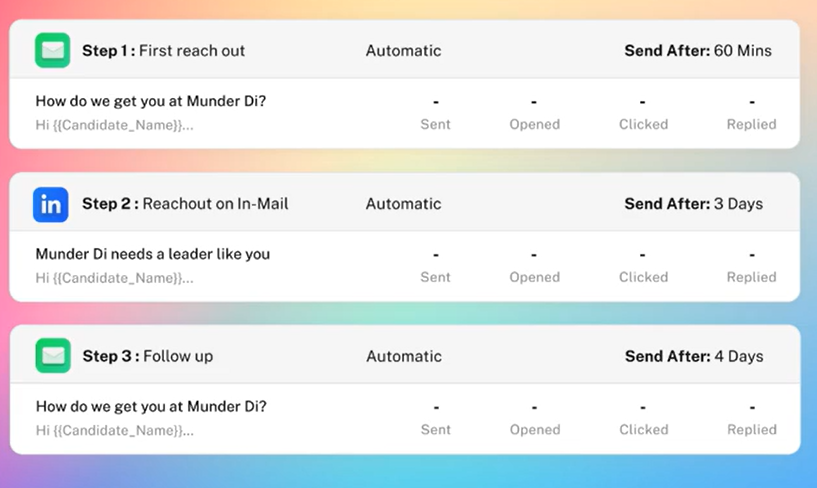
What it means: Can your ATS automate communication with candidates across the hiring stages, including updates, follow-ups, and rejections?
Why it matters: It directly impacts candidate experience and reduces drop-offs caused by slow or inconsistent communication.
What to check:
- Automated email sequences for outreach, updates, and rejections
- Track candidate interactions across stages
- Personalized communication templates
- Generative AI for creating messages
Red flags:
- Communication happens outside the ATS
- Rejections and updates are sent manually
- No personalization or templates
Decision rule: If candidates do not receive timely updates without manual effort, your ATS is hurting the candidate experience.
Product features
12. How does your ATS streamline the offer and hiring process?
What it means: Can your ATS manage the entire offer stage, from approvals to offer rollout and tracking, within one system?
Why it matters: It directly impacts offer acceptance speed and prevents delays or drop-offs at the final stage.
What to check:
- Built-in offer letter templates
- Ability to send and track offers from within the ATS
- Approval workflows for offers
- Visibility into offer status and acceptance
Red flags:
- Offer process managed outside the ATS
- Manual approvals and tracking
Decision rule: If offer rollout and tracking require external tools or manual coordination, your ATS is slowing down final-stage conversions.
13. Do you have customizable career pages?
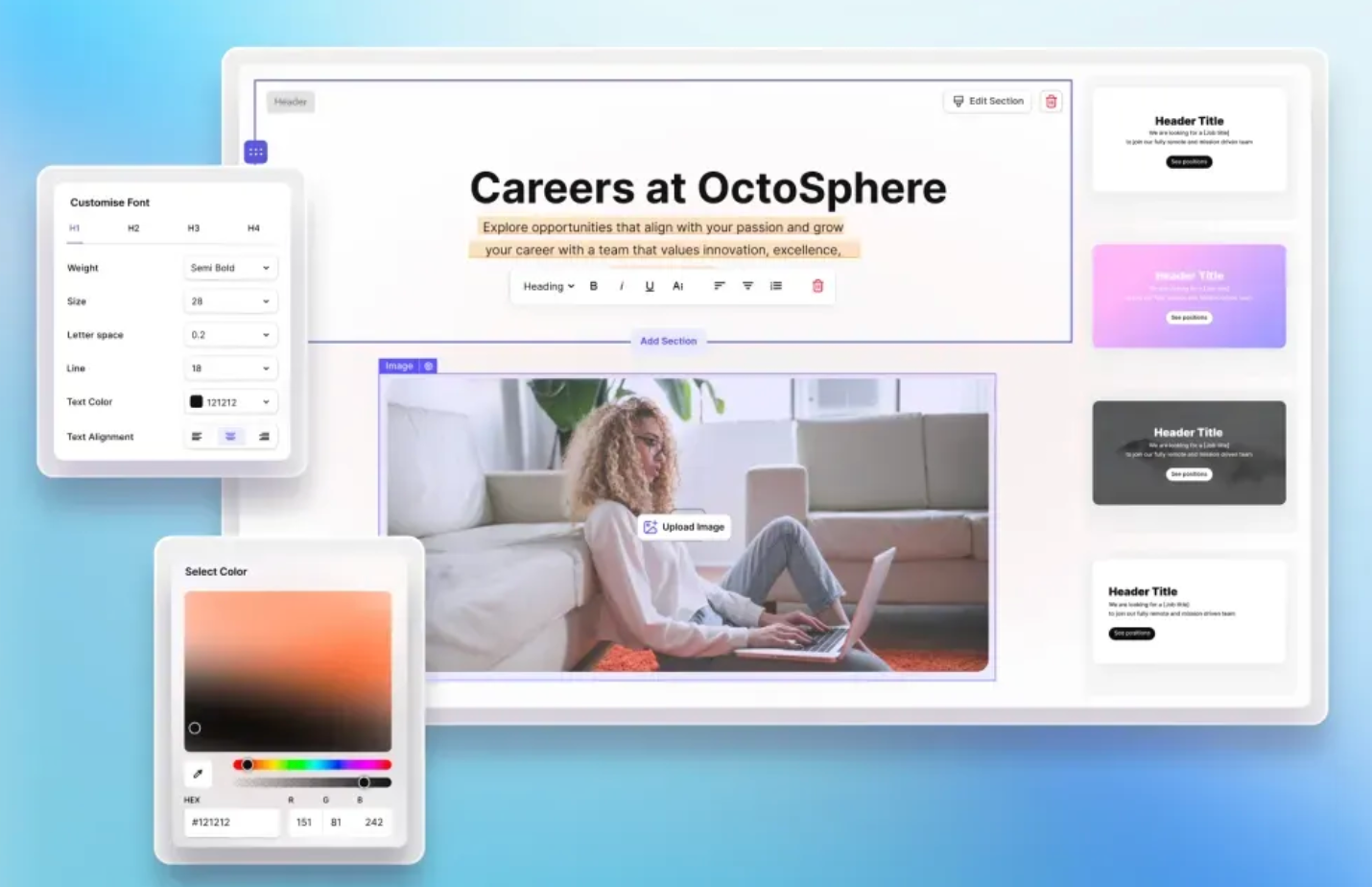
What it means: Can your ATS help you create and manage branded career pages without needing any help from IT?
Why it matters: It determines how effectively you attract qualified candidates and communicate your employer value.
What to check:
- Customizable career pages without technical support
- Role-specific landing pages or portals
- Mobile-friendly application experience
Red flags:
- Requires developer support for updates
- Inconsistent branding across listings
Decision rule: If your career page cannot effectively convert visitors into applicants, your ATS is limiting your top-of-funnel.
14. Does your ATS software support recruitment marketing?
What it means: Can your ATS distribute jobs across multiple channels and manage candidate attraction from one place?
Why it matters: It determines how efficiently you reach the right candidates without increasing sourcing effort.
What to check:
- Multi-channel job posting (job boards, social platforms)
- Centralized management of job distribution
- Tracking performance across channels
Red flags:
- No visibility into channel performance
- Requires multiple tools for job promotion
Decision rule: If job distribution is manual or fragmented, your ATS is limiting your candidate reach and slowing sourcing.
15. Does your ATS help employee referral programs?
What it means: Can your ATS manage employee referrals end-to-end, from submission to tracking and reporting?
Why it matters: It enables you to tap into high-quality talent sources without increasing sourcing costs.
What to check:
- Easy referral submission for employees
- Tracking of referral status and ownership
- Unique referral links or campaigns
- Reporting on referral performance
Red flags:
- No visibility into referral sources or outcomes
- No structured referral workflow
Decision rule: If referrals are not systematically tracked and optimized, you are underutilizing one of your highest-quality hiring channels.
Reporting features
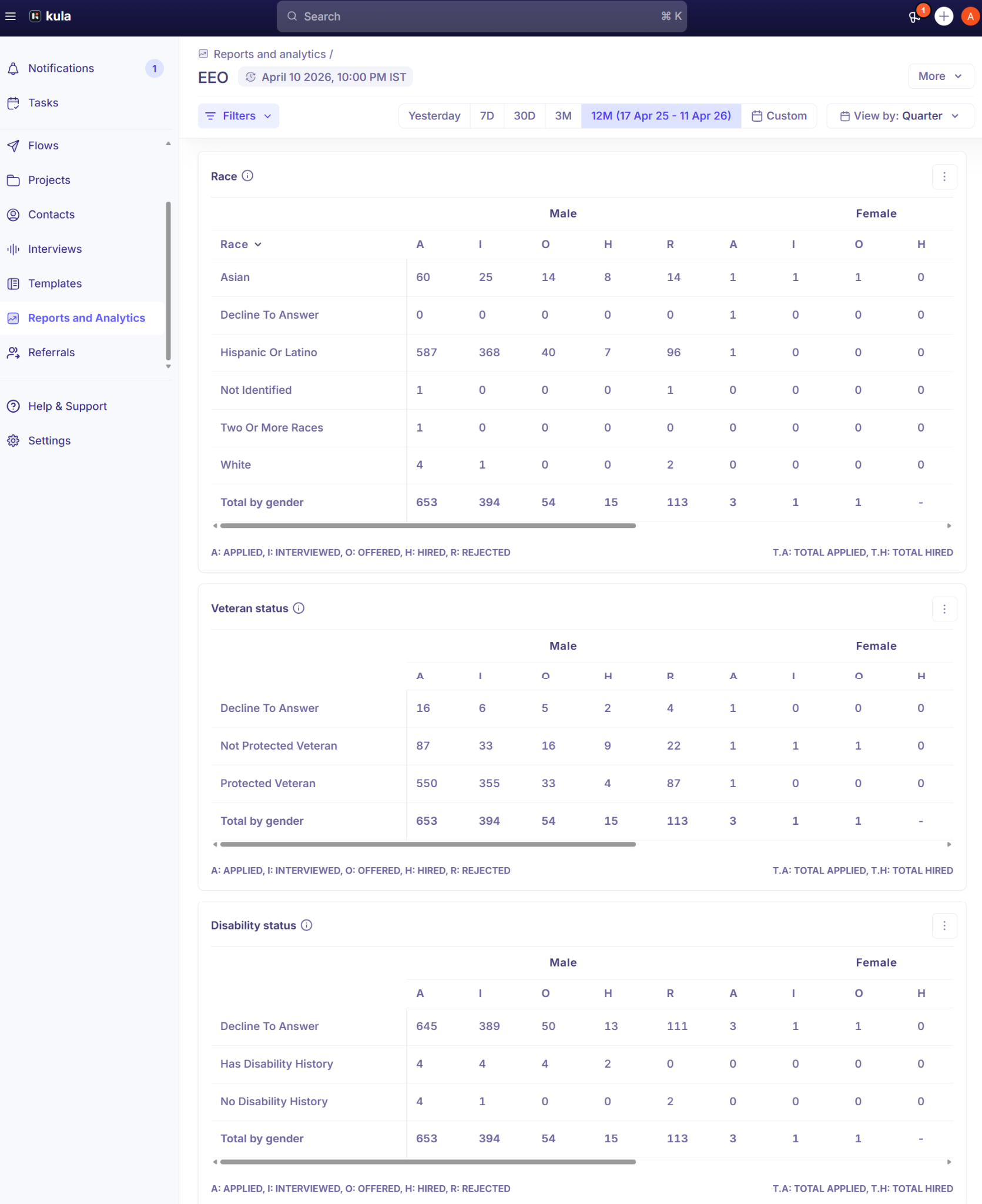
16. Does your ATS promote diversity efforts?
What it means: Can your ATS track and support diversity metrics across your candidate pipeline?
Why it matters: It ensures you can measure and improve diversity efforts while maintaining compliance and fair hiring practices.
What to check:
- Tracking of diversity metrics across pipeline stages
- Ability to anonymize or hide sensitive candidate data
- Reporting on diversity by source, stage, or role
Red flags:
- Manual or external tracking required
- No support for bias reduction in workflows
Decision rule: If you cannot measure diversity across your pipeline, you cannot improve or enforce fair hiring practices.
17. Can I access custom reports and download them?
What it means: Can your ATS generate customizable reports based on your specific hiring metrics and export plus share reports easily for stakeholders and decision-makers?
Why it matters: It determines whether your team can make data-driven decisions and ensures hiring insights can be communicated clearly.
What to check:
- Create visual custom reports on demand
- Flexibility to define your own metrics
- Export options (CSV, Excel, etc.)
- Easy formatting for stakeholder use
Red flags:
- Limited to predefined reports
- Requires external tools for deeper analysis
Decision rule: If you cannot customize reports to answer your specific hiring questions, your ATS is limiting decision-making.
18. Does your ATS support AI for workflows?
What it means: Does your ATS use AI to automate tasks, improve decision-making, and enhance hiring efficiency?
Why it matters: It determines whether your ATS reduces recruiter workload or just adds surface-level automation.
What to check:
- AI for resume screening and candidate matching
- Predictive insights (e.g., hiring timelines, candidate success likelihood)
- AI-assisted job descriptions or communication
- Automated interview notes or summaries
Red flags:
- AI is limited to basic keyword matching
- AI features feel like add-ons, not integrated into workflows
Decision rule: If AI does not reduce manual effort or improve decision accuracy, it is a feature, not a capability.
Candidate offer
19. Can I configure approvals within the ATS?
What it means: Can your ATS manage approval processes for hiring decisions, offers, and requisitions within the system?
Why it matters: It ensures hiring decisions move forward without delays caused by manual approvals or lack of visibility.
What to check:
- Configurable approval workflows (sequential or parallel)
- Visibility into approval status
- Notifications for pending approvals
Red flags:
- Approvals managed over email or external tools
- Limited flexibility in approval workflows
Decision rule: If approvals are not automated and trackable, they will become a bottleneck in closing candidates.
20. Can your system generate new hire forms?
What it means: Can your ATS generate and manage new hire forms required for onboarding within the system?
Why it matters: It ensures a smooth transition from candidate to employee without manual paperwork or data loss.
What to check:
- Automated generation of new hire forms
- Capture of essential data (tax, bank, legal details)
- Integration with onboarding workflows
- Secure data handling
Red flags:
- Forms handled outside the ATS
- No integration with onboarding systems
Decision rule: If onboarding data collection is manual or fragmented, your hiring process breaks at handoff.
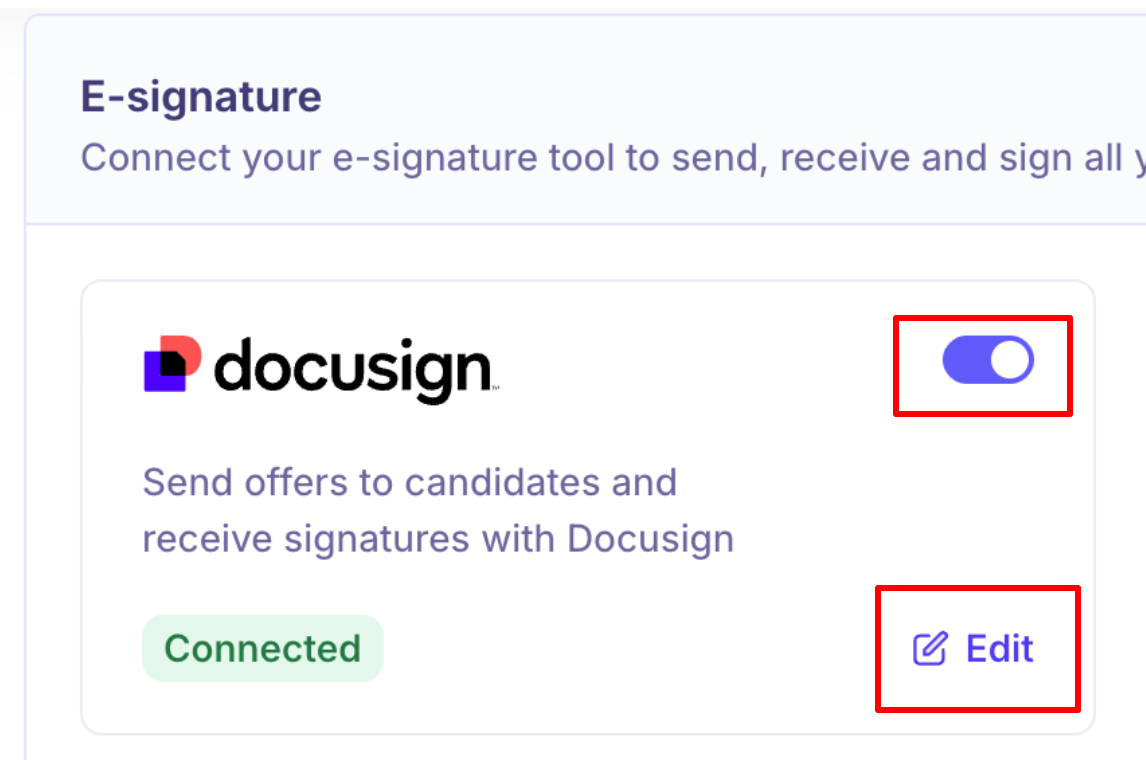
21. Does your ATS integrate with DocuSign?
What it means: Does your ATS integrate with e-signature tools to enable seamless offer acceptance and document signing?
Why it matters: It determines how quickly candidates can accept offers and complete formalities without delays.
What to check:
- Integration with e-signature platforms (e.g., DocuSign)
- Ability to send and track signed documents within the ATS
- Status visibility for pending signatures
Red flags:
- Requires switching tools for document signing
- Manual follow-ups for signed documents
Decision rule:
If candidates cannot complete signing within the hiring workflow, you are introducing unnecessary friction at the final stage.
Integration
22. How does your ATS integrate with other recruiting tools?
What it means: Can your ATS integrate seamlessly with your existing HR tech stack and external recruiting tools?
Why it matters: It determines whether your hiring process runs smoothly in one system or gets fragmented across multiple tools.
What to check:
- Integrations with core systems (HRIS, payroll, background checks)
- Calendar and communication tool integrations (Google Calendar, Outlook 365, Microsoft Exchange, and MS Office)
- Job board and sourcing platform integrations
- Open APIs for custom integrations
- Bi-directional data sync across systems
- Social media integration, including LinkedIn, Twitter, Facebook, and more.
- Video platforms such as Zoom, Google Meet, and Microsoft Teams.
Red flags:
- Requires engineering effort for basic integrations
- Frequent tool switching despite integrations
Decision rule: If your team still switches between multiple tools to complete one hiring workflow, your ATS integrations are not effective.
User interface
23. Does your ATS have a steep learning curve?
What it means: How quickly can recruiters, hiring managers, and stakeholders start using the ATS effectively without extensive training?
Why it matters: It directly impacts adoption across the team.
What to check:
- Intuitive interface for recruiters and hiring managers
- Minimal training required for daily tasks
- Drag and drop candidate profiles
Red flags:
- Hiring managers avoid using the system
- Heavy dependence on support or technical teams
Decision rule: If your team cannot confidently use the ATS within a few days, adoption will drop, and the system will fail operationally.
24. Can your ATS enhance team collaboration?
What it means: Can your ATS enable seamless collaboration between recruiters, hiring managers, and stakeholders within one system?
Why it matters: It ensures faster decisions.
What to check:
- Shared access to candidate profiles and pipeline
- Ability to leave notes, feedback, and evaluations in one place
- Real-time updates and notifications for team members
- Mentions or tagging to involve stakeholders quickly
- Centralized communication and activity tracking
Red flags:
- No centralized activity or communication history
- Delays due to a lack of coordination
Decision rule: If hiring decisions depend on communication outside the ATS, collaboration will break down and slow hiring
Implementation
25. Do you have a dedicated customer success team?
What it means: Does the ATS vendor provide a dedicated team to guide implementation, setup, and ongoing success?
Why it matters: It determines how quickly and smoothly your team can adopt the system.
What to check:
- Dedicated point of contact during implementation
- Support for data migration from existing systems
- Guided setup for workflows, integrations, and configurations
- Training for recruiters and hiring managers
- Chat support for quick queries
Red flags:
- Heavy reliance on self-setup or documentation
- Limited support during data migration
Decision rule: If implementation depends entirely on your internal team without expert support, adoption will be slow and error-prone.
26. What is the average implementation speed?
What it means: How long does it take to fully implement the ATS, including setup, data migration, integrations, and team onboarding?
Why it matters: It determines how quickly you can start using the system without disrupting ongoing hiring operations.
What to check:
- Clear implementation timeline with defined milestones
- Scope of work covering setup, integrations, and migration
- Time required for data migration and validation
- Training and onboarding timeline for teams
- Testing phase before full rollout
Red flags:
- Vague scope with undefined responsibilities
- No structured onboarding or testing phase
Decision rule: If the vendor cannot provide a clear, time-bound implementation plan, expect delays and disruption to your hiring process.
27. Are there set-up fees and does it support multiple languages?
What it means: What are the total implementation costs, and does the ATS support multi-language hiring?
Why it matters: It determines the true cost, risk, and scalability of your ATS during implementation and global hiring.
What to check:
- Clarity on setup or implementation fees beyond subscription
- Support for multiple languages in candidate-facing interfaces
Red flags:
- Hidden or unclear setup costs
- Limited or no multi-language support
Decision rule: If costs, or global capabilities are unclear, you are likely to face unexpected expenses and operational challenges post-implementation.
28. What are the common challenges during data migration to your system?
What it means: What challenges can arise when moving your existing hiring data into the new ATS?
Why it matters: It determines whether your transition will be smooth or lead to data loss, delays, and compliance risks.
What to check:
- Clear migration process and data mapping approach
- Handling of data security and compliance requirements
- Support for importing historical data (candidates, notes, resumes)
Red flags:
- No clear migration plan or ownership
- Limited support for legacy data formats
- No examples of past successful migrations
Decision rule: If the vendor cannot clearly explain how your data will be migrated and validated, expect disruptions and data inconsistencies.
29. What are the limitations of your product?
What it means: What are the known limitations of the ATS, and where does it fall short for your use case?
Why it matters: It helps you identify gaps early and avoid surprises after implementation.
What to check:
- Transparency about product limitations
- Fit with your specific hiring needs and workflows
- Workarounds or alternatives for known gaps
- Product roadmap for future improvements
Red flags:
- Vendor avoids discussing limitations
- Overpromising capabilities without proof
- Gaps in critical features for your use case
Decision rule: If limitations are unclear before purchase, they will become blockers after implementation.
Technology stack
30. Is your ATS cloud-based or on-premise?
What it means: Is the ATS cloud-based or on-premise, and how does that impact accessibility, maintenance, and control?
Why it matters: It determines how easily your team can access the system and how much operational overhead you need to manage.
What to check:
- Cloud-based access from anywhere
- Hosting, maintenance, and updates managed by the vendor
- Data hosting location options (if relevant for compliance)
- System reliability and uptime guarantees
Red flags:
- Requires internal infrastructure or maintenance
- Frequent downtime or performance issues
Decision rule: If your team cannot access and use the system seamlessly from anywhere, it will slow down hiring operations.
31. Does your system use multi-tenant architecture?
What it means: Does the ATS use a multi-tenant architecture where multiple customers share infrastructure while keeping data securely isolated?
Why it matters: It impacts scalability, cost efficiency, and how quickly the system can evolve with updates.
What to check:
- Secure data isolation between customers
- Scalable infrastructure for growing hiring needs
- Regular updates without disruption
- Performance consistency across usage
Red flags:
- No clarity on data isolation
- Delays in product updates or improvements
- Performance issues with increased usage
Decision rule: If the system cannot scale or ensure secure data separation, it will create risks as your hiring grows.
32. Have you experienced data breaches in the past?
What it means: How secure is the ATS, and has the vendor experienced any data breaches in the past?
Why it matters: It determines how safely your candidate's and company's data is stored and protected.
What to check:
- Security certifications and compliance standards
- Encryption and access control measures
- Transparency about past security incidents
- Regular security audits and testing
- Compliance with standards (GDPR, ISO, SOC 2, etc.)
- Data encryption (at rest and in transit)
- Role-based access and authentication controls
Red flags:
- No clear compliance or certification details
- Weak access control mechanisms
Decision rule: If the vendor cannot clearly demonstrate strong security practices and transparency, your data is at risk.
33. How frequently are software updates made?
What it means: How frequently does the ATS release updates, improvements, and security fixes?
Why it matters: It ensures the system stays reliable, secure, and aligned with evolving hiring needs.
What to check:
- Regular release cycles for updates and improvements
- Timely bug fixes and security patches
- Communication about upcoming changes
- Minimal disruption during updates
Red flags:
- Delays in fixing bugs or security issues
- Updates that disrupt workflows
Decision rule: If the product does not evolve consistently, it will become outdated and limit your hiring efficiency.
34. Does your system come with mobile compatibility?
What it means: Can your ATS be used effectively across devices such as smartphones, tablets, and browsers?
Why it matters: It allows recruiters and hiring managers to take action quickly without being tied to a desktop.
What to check:
- Mobile-friendly interface or dedicated app
- Consistent experience across devices
- Candidate-friendly mobile application process
Red flags:
- Missing key features on mobile
- Candidate application not optimized for mobile
Decision rule: If key hiring actions cannot be completed on mobile, your team will face delays in decision-making.
Training
35. Can your ATS vendor offer training, and how long does the training process take?
What it means: Does the ATS vendor provide structured training, and how long does it take for your team to become fully operational?
Why it matters: It determines how quickly your team can adopt the system and start using it effectively without disrupting hiring.
What to check:
- Vendor-led training for recruiters and hiring managers
- Clear onboarding timeline and training duration
- Role-based training (basic to advanced usage)
- Access to self-serve resources like help centers or documentation
- Availability of sandbox or testing environments
Red flags:
- Heavy reliance on self-learning
- Unclear or lengthy onboarding timelines
Decision rule: If your team cannot become fully functional within a defined and reasonable timeframe, adoption will slow down and impact hiring efficiency.
Customer support
36. Do you have 24/7 customer support?
What it means: Does the ATS vendor provide reliable and timely customer support across time zones when issues arise?
Why it matters: It determines how quickly problems are resolved without disrupting your hiring operations.
What to check:
- 24/7 support availability or clear support hours
- Defined response and resolution times (SLA)
- Multiple support channels (chat, email, phone)
- Access to self-serve resources like help centers or knowledge bases
- Availability of dedicated account support if needed
Red flags:
- Claims 24/7 support, but no defined response times
- No escalation process for urgent issues
Decision rule: If you cannot get timely support when issues occur, your hiring process will face unnecessary delays.
ATS Evaluation Framework Checklist for 2026
.png)
Common mistakes when choosing an ATS
1. Choosing Based on Feature Lists
Teams compare ATS tools using feature checklists instead of how hiring actually runs. This leads to buying tools that “have everything” but don’t work together in real workflows.
What happens: recruiters still switch tools, coordinate manually, and workflows break.
What to do instead: map your actual hiring process and test if the ATS can execute it end-to-end without friction.
2. Overvaluing Integrations
Many teams assume more integrations = better system. In reality, most integrations are shallow and don’t reduce workflow complexity.
What happens: tools are technically connected, but recruiters still copy data, switch tabs, or manage steps manually.
What to do instead: evaluate whether integrations remove steps, not just connect systems.
3. Ignoring Recruiter Usability
Decision-makers often choose ATS tools without considering how recruiters and hiring managers will actually use them daily.
What happens: low adoption, workarounds outside the system, and inconsistent data.
What to do instead: involve recruiters in testing and check if key tasks can be done quickly without training.
4. Assuming AI = Value
Teams get sold on AI features without validating if they improve outcomes. Many ATS tools add AI as a layer without changing workflows.
What happens: recruiters still manually screen, validate, and decide, so AI adds complexity instead of saving time.
What to do instead: check if AI reduces actual steps in hiring, not just generates outputs.
5. Relying Only on Demos
Demos are controlled environments designed to show the best-case scenario, not real usage.
What happens: the tool looks smooth in demos but breaks when applied to real hiring scenarios.
What to do instead: run real use cases or request a sandbox and simulate an actual hiring workflow.
ATS Comparison Thinking (How to Evaluate Options)
All-in-One ATS vs Multi-Tool Stack
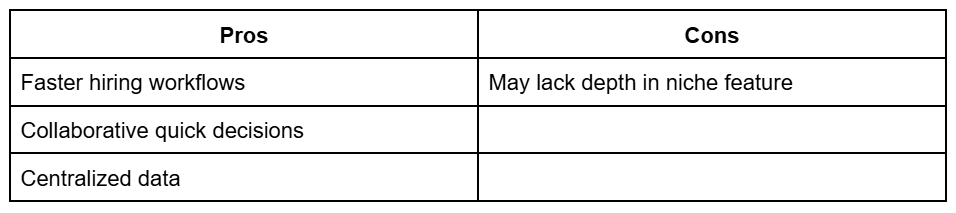
All-in-One ATS
An all-in-one platform handles sourcing, communication, CRM, reporting, interview scheduling, and offer management with a single tool.
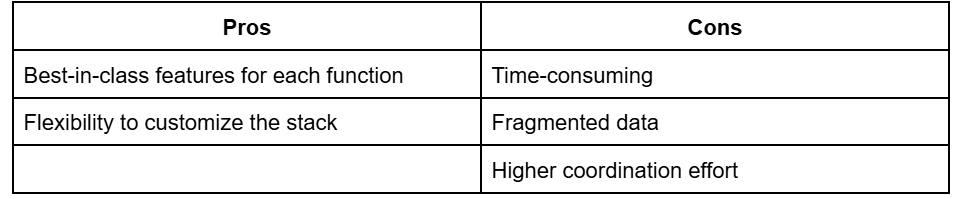
Multi-Tool Stack
A multi-tool stack is when recruiters use different tools for sourcing, CRM, HR, and interviews, all connected via integrations.
How to decide:
If you want the hiring team to make quick decisions, collaborate easily, and put in less effort, an all-in-one ATS should be your choice.
Legacy ATS vs modern ATS
Legacy ATS
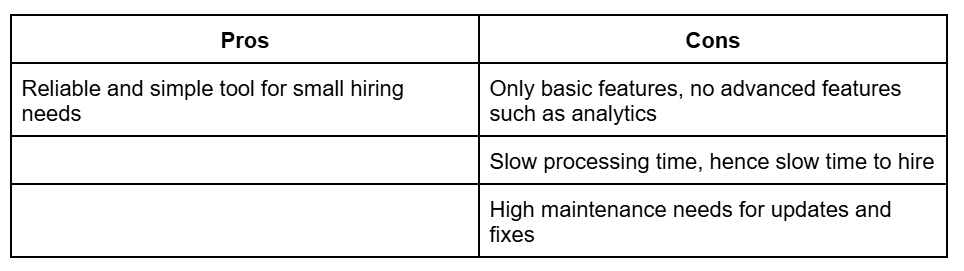
A legacy ATS tool helps recruiters store and track applications but does not optimize hiring prices. Legacy ATS has been around for years and offers keyword-based application matching with no contextual understanding and basic hiring insights.
Modern ATS
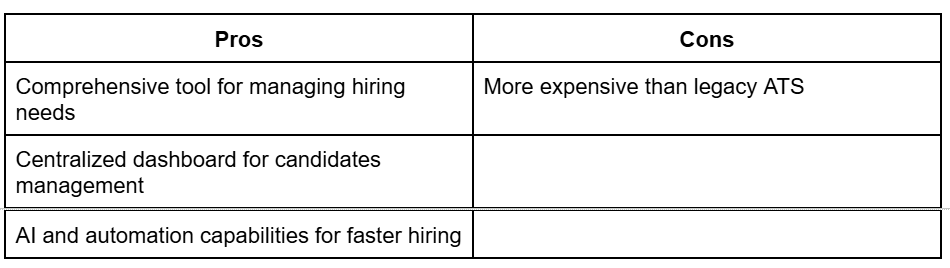
Modern ATS is an advanced version of legacy ATS, which includes all advanced features and automated workflows for sourcing, screening, tracking, and interviews.
How to decide
Choose a modern ATS with automated workflows and a centralized dashboard to engage top candidates faster in a competitive market.
AI-native vs AI add-on systems
AI-native
AI-native ATS offers all AI capabilities built into the tool itself for screening, interview transcripts, outreach messages, career pages, and job descriptions.

AI add-on systems
For the AI add-on system ATS, AI is layered on top of the existing workflows and does not come built into the tool. Recruiters can add AI add-on tools where they see a gap.

How to decide
If your goal is to create faster hiring cycles, choose an AI-native platform.
How to run an ATS evaluation process
1. Define hiring requirements
Start by identifying what your hiring actually looks like. This includes hiring volume, types of roles, team structure, and how frequently you hire.
2. Map current workflow gaps
Break down your current hiring process step by step and identify where things slow down or break. Look for delays in scheduling, lack of visibility, or excessive manual coordination.
3. Shortlist tools
Select a small set of ATS options that align with your hiring requirements and eliminate those that clearly do not fit. Avoid evaluating too many tools, as it makes comparison difficult and slows decision-making. Focus on quality of fit, not quantity of options.
4. Run demos with real use cases
Ask vendors to walk through your actual hiring scenarios, such as screening candidates or scheduling interviews. Real use cases reveal how the system performs under your conditions.
5. Involve recruiters (not just leadership)
Include recruiters and hiring managers in the evaluation process since they will use the system daily. Leadership may focus on features or pricing, but recruiters understand workflow friction.
6. Test workflows, not features
Instead of checking whether a feature exists, test how it works in a complete hiring flow. For example, move a candidate from application to offer and observe how many steps are required.
A tool with fewer features but better execution will outperform a feature-heavy system that slows your team down. Focus on how the system performs in practice, not how it is marketed.
Why do modern ATS platforms fit current needs?
A modern AI-native all-in-one ATS is the future. It helps the recruiting team move faster without the friction of add-on tech stacks and fragmented data.
Such ATS tools not only cater to sourcing, tracking, screening, scheduling, analytics, and offer management in one platform, but the built-in AI also helps recruiters screen candidates faster, nurture talent automatically, and collaborate with stakeholders effortlessly.
One such modern ATS tool is Kula. Kula is a recruiter-first ATS tool that has built-in AI for each hiring stage workflow. Kula supports:
- Generative AI for JD, career pages and outreach messages
- Chrome extension for one-click sourcing
- AI for screening, interview transcripts and conversational analytics
- Automated workflows for structured screening, sourcing and interviews
If your team is spending more time managing tools than hiring candidates, Kula can change that. Book a personalized demo and see how it simplifies execution.